
dB traktor history mockup icon
roger DJ oddBeat

dB traktor
history mockup

v1.1.0 · macOS · THM

post your set without doxxing your tracklist.
fake names, real audio.


download v1.1.0 buy license — 7€ →
macOS · Apple Silicon · standalone .app · no Python required
Opening it the first time on macOS

macOS checks apps from outside the App Store on first launch. If you see “Apple could not verify… is free of malware”, don’t worry — the app is signed & notarized by Apple. To open it:

  1. Click Done — never “Move to Bin”.
  2. Open System Settings → Privacy & Security.
  3. Scroll down and click Open Anyway next to “dB traktor history mockup”, then confirm.

You only do this once — after that it opens like any other app.
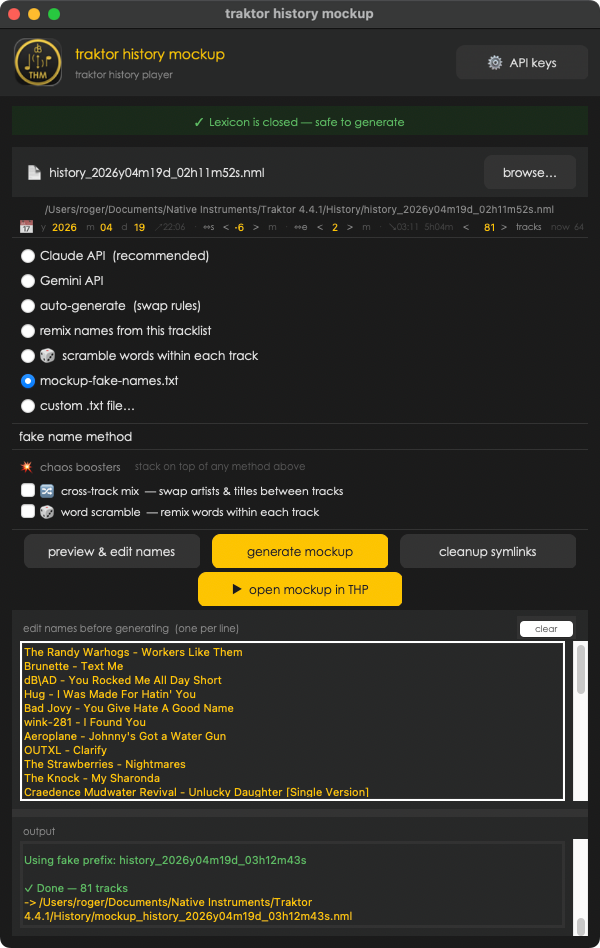
dB traktor history mockup app preview
↓ what does it do ↓
💡 pro tip — shadow-free screenshots

take a window screenshot with Cmd+Shift+4, then press Space and click the app window. hold Option while clicking to skip the drop shadow. add Ctrl to copy to clipboard instead of saving to disk.

to disable shadows permanently, run these two commands in Terminal:

defaults write com.apple.screencapture disable-shadow -bool true
killall SystemUIServer

to restore shadows: change true to false and rerun.

what it can do
🎭

fake names, real audio

generates a new .nml file with fake track names. the real audio still plays through THP — via symlinks that redirect the file paths.

🤖

AI-powered names

Claude or Gemini AI generates plausible-sounding fake artist and title names. not random gibberish — names that look like real tracks.

⚙️

multiple methods

Claude AI · Gemini AI · auto-swap rules · word scramble · cross-track remix · your own .txt file. pick what fits your workflow.

🔗

symlink magic

creates symlinks so THP still finds and plays your actual audio files under the fake filenames. no file copying, no duplicates.

🧹

clean up after

one click removes all symlinks from all music directories. leaves your library exactly as it was.

▶️

open in THP

after generating, one button opens the mockup .nml directly in THP. screenshot-ready in seconds.

how you use it
1

drop your .nml

drag & drop any Traktor history file onto the app, or use the browse button to find it.

2

pick a method

choose how names get faked: Claude AI, Gemini, word scramble, cross-track remix, or your own list.

3

generate + post

hit generate. open in THP, take your screenshot, post it. clean up symlinks when done.

also in the box
🎛️

track count control

set exactly how many tracks to include in the mockup. type in any number, or go up to the full set.

⚠️

library manager warning

THM reminds you to close library manager before generating. symlinks + library manager = mess. you've been warned.

🔑

API key storage

Claude and Gemini API keys stored locally in ~/.config/thp-mockup/config.json — not in env vars, works in .app bundle.

AI generation costs: Claude ~€0.002/run · Gemini Flash free tier

pricing

questions? [email protected]

why this exists

people kept asking DJs in facebook groups:
"what was that track at 1:23?"
and the honest answer was always "not telling you."
now you can post the set. and still not tell them.

your sets are yours. post the vibe, keep the secrets.

part of the THP family
THP icon
traktor history player
v3.6.0 · €22 · 7-day free trial

browse, play and auto-crossfade your Traktor DJ history. THM is free when you buy THP.

learn about THP →